

Improve an existing security operation
Review sources that are difficult to onboard or produce inconsistent logs. Use normalisation, enrichment and data-quality monitoring to prepare more usable input for your analysts and existing detection tools.
Security data pipelines

Prepare security telemetry before it reaches your analytics tools. VirtualMetric DataStream gives Australian and New Zealand businesses, MSPs and MSSPs a central place to collect, transform and direct logs across their security environments.

Your local product conversation.BCC · Channel partner & distributor · Australia & New Zealand
The business opportunity
Security information and event management (SIEM) platforms depend on useful, consistent input. DataStream sits between log sources and destinations, preparing telemetry for detection, investigation and retention. Separate collection and processing decisions from your choice of SIEM, so you can adapt the data flow as business requirements, customer environments and platforms change.
Inside DataStream
Explore the capabilities that matter to your environment and the services you deliver.
See it in a demoBring together telemetry from endpoints, servers, network equipment, applications and cloud services. Use available content packs and repeatable collection configurations to reduce the need to build each connection from scratch.
Parse fields, standardise values and add context through a processing pipeline. Supported schemas include ASIM, OCSF, ECS, CIM and UDM, helping different destinations receive data in the structure they expect.
Apply field-level reduction and optional event filtering before logs reach a metered analytics destination. Test changes against representative logs and measure the effect, with detection and investigation requirements guiding what you retain.
Connect one source to several destinations or bring multiple sources into a shared workflow. Keep processing logic in the pipeline and choose destinations to suit the purpose of each stream.
For MSSPs, central management brings customer configurations and pipeline visibility into one portal. Reuse configurations for common sources while maintaining separate customer pipelines, destinations and policies.
Inspect how processors change sample or live logs before rollout. Monitoring and schema-drift detection help teams identify interrupted sources, destination issues and unexpected format changes that need attention.
A practical architecture
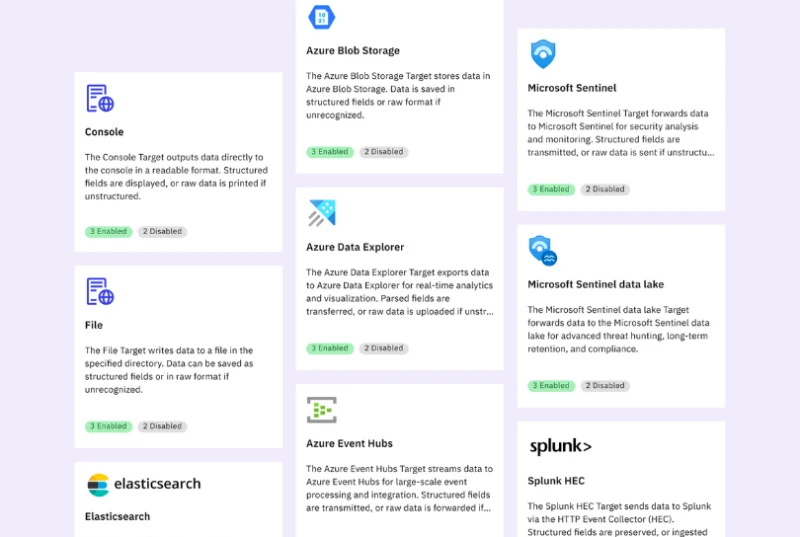
Different jobs call for different data destinations. DataStream lets you design a flow that sends detection data to your SIEM while retaining other telemetry in an appropriate storage or analytics tier. Your retention policy and investigation needs determine the final design.
Direct detection-relevant telemetry to active analytics, with separate routes for bulk data and longer-term retention. Assess both destination costs and the information your team needs to investigate.
For Sentinel deployments, ASIM normalisation and routing options span Sentinel Analytics, Sentinel data lake, Azure Blob and Azure Data Explorer. Validate the selected targets and schemas against your environment.
Where it fits
Use these scenarios to start a practical conversation about product fit.
Review sources that are difficult to onboard or produce inconsistent logs. Use normalisation, enrichment and data-quality monitoring to prepare more usable input for your analysts and existing detection tools.
MSPs and MSSPs can build a repeatable workflow around customer onboarding, shared pipeline patterns and ongoing monitoring. Central configuration helps apply common improvements across customers using the same sources.
Send live telemetry to current and proposed SIEMs in parallel. Validate schemas, detection coverage and ingestion behaviour before moving sources over, while carrying existing pipeline processing into the new architecture.
Identify which data needs active SIEM analysis and which belongs in another tier. Compare representative before-and-after volumes and destination charges to build an evidence-based business case for your own environment.
Plan the right setup
DataStream separates its management console from the processing layer. Directors run the pipelines within your environment; in the connected model, configuration and operational metadata synchronise with VirtualMetric Cloud. Logs flow to the destinations you configure.
Consider on-premises, customer-cloud or hybrid placement, plus container and serverless deployment options. Confirm infrastructure and network requirements for the chosen model.
Self-managed operation, air-gapped environments and high-availability configurations are available in Enterprise. Confirm edition entitlements and your data-handling requirements during solution design.
Select representative sources, destinations and detection rules. Measure volume, check output quality and validate buffering, recovery and retention arrangements before extending the rollout.
A little more detail
Have a specific requirement? We can bring the right people into the conversation.
Ask about DataStreamDataStream prepares and routes data for the security platforms you use. Your SIEM continues to provide its analytics and detection functions. The pipeline layer manages collection, transformation and delivery before that analysis takes place.
Documented destinations include Microsoft Sentinel, Splunk, Elastic and Google SecOps, alongside data lakes and storage such as Azure Blob and Amazon S3. Check the required source, schema, authentication method and target combination during evaluation.
DataStream supports agentless collection using read-only connections where supported. Lightweight Windows and Linux agents are also available for situations that require them. The suitable method depends on each source and its network access.
The outcome depends on your log mix, existing configuration, detection requirements and destination pricing. Use pipeline prediction and measured destination volumes to assess your own case. A reduction in data volume is not automatically the same reduction in your total security spend.
DataStream uses local write-ahead-log buffering to queue data for delivery when a destination recovers. Size the deployment for expected volumes and outage periods, and test recovery as part of your operational acceptance.
BCC is a distributor and channel partner for VirtualMetric DataStream across Australia and New Zealand. Contact BCC to discuss a business deployment, managed service or reseller opportunity, and bring your source list, current platforms and intended outcomes.
For ANZ resellers & service providers
Help your clients get more from their technology. Build the next opportunity with BCC.
Talk to us about your customers, a product demonstration and reseller options across Australia and New Zealand.
Explore the vendor’s product information:
Features and availability depend on vendor plans and terms. Cost outcomes depend on your environment, usage and licensing. Product names and logos belong to their respective owners.